Monday, September 21, 2026

Blade Selection Basics: 4 Questions For the Right Blade


Scroll Saw Blade Selection Basics


One of the top questions we receive at Bear Woods is: 
Which scroll saw blades should I choose? 
Our simplest possible answer is this: Pegas Modified Geometry blades are consistently the most popular and most frequently repurchased blades.

What that doesn't account for is which of the 7 Modified Geometry blade sizes will work best and why another tooth configuration might be preferred in certain situations. 

There is more to it, but we can start with 4 main questions when choosing blades. 

1. How thick is the material being cut? 

Thicker Materials 
Choose a blade with a higher number and lower TPI (teeth per inch). The blade will have less teeth overall, but the teeth will be larger.

Thinner Materials 
Choose a blade with a lower number and higher TPI. The blade will have more, smaller teeth overall.

The lower the number, the thinner the blade.
Tip: If you are using blades that are too thin for the material you are cutting, you will likely see more blade breakage.

2. What material is being cut? 

  • Hardwoods 
  • Medium Hardwoods 
  • Soft Woods 
  • Plywood 
  • Corian/Plastics 
  • Aluminum/Brass/Copper 
  • Ferrous Metals 
Certain blade styles are better for each individual wood / material classification. The blade selection chart on our website details the suitability of blade style and number vs material & material thickness.


3. How thin/tight do the cut lines need to be? 

Thinner blades and spirals allow for tighter, more intricate cuts. Cut lines themselves are important when making puzzles or intarsia pieces. For these types of projects, you want next to not cut lines showing. 
The technical blade selection chart on our website outlines how thin cut lines will be and how intricate the blades will cut. A simplified version of the technical sheet with the most popular Pegas blades can be found at the end of this document.

4. Flat or spiral, regular or pinned?

Flat Blades
Flat blades are the most popular scroll saw blade type. All the teeth are lined up on one side. The scroller turns the wood to follow the pattern and always pushes forward to cut. (The above image is an example of flat blades).

Spiral Blades
Spiral Blades have teeth around 360° of these blades allowing them to cut in every direction. The work does not have to be turned to make cuts which allows sharp inside corners to be created. This also allows working longer pieces which typically can't be turned on a 16" or 21" scroll saw. Tip: If you are using blades that are too thin for the material you are cutting, you will likely see more blade breakage. (See image below for a close-up of spiral blades!) 
Pinned End Blades
Pinned end blades have good performance for use with 15" and 16" power scroll saws such as Sears Craftsman, Delta, and Ryobi. Most scroll saws take plain or flat end blades, though some models take 5" or 3" pinned end blades. Choosing pinned end blades is different than flat end, TPI and wood thickness recommendations being the most important factors. Pinned blade specs based on dimensions where flat blades are based on numbers.

Note: Pinned blades are not available with a spiral tooth configuration. To use spiral blades with your pinned blade saw, look into a flat blade adapter kit (available very soon from Bear Woods).

Follow the links (in red on the PDF) to read more on each specific blade!

Special Note for Printing the Guide: On the first page, the top (red) link has a black and white option to save printer ink if you want to print the guide, otherwise the guide is in full color!


https://www.bearwood.com/
Bear Woods has been around since 1987 serving our hobby. They offer a wide range of craft products including Pegas scroll saw blades, clock inserts, toy parts, workshop supplies and much more. In my ten years of writing the Scrollsaw Workshop blog I have never received a complaint about Bear Woods. I get thousands of email a month so that's saying something about their customer service and quality products. Please support the people who support our hobby. Click now and visit Bear Woods.
https://www.bearwood.com/en-us/collections/usa-made-quality-wood-burning-pyrography-supplies
Colwood and Razertip are trusted by the community of makers for their precision pyrography tools that deliver exceptional quality and fine detail. These tools can also be used on Scroll Saw Projects to add beautiful woodburning accents and finishing touches.

Free Pattern Catalog. 1000's of free patterns.

http://www.stevedgood.com/catalog/

Thousands of FREE scroll saw patterns. No registration or signup required.

The projects form these patterns can be sold without restrictions. The patterns cannot be sold.

Click here for the Free Online Catalog.

-

Stencil Printer 1.7

Stencil Printer Instruction Video.

The Scrollsaw Workshop Stencil Printer 1.7 is my latest software for creating patterns. It will create key chain fobs, desk name plates and more. Click the image above to download the latest version. It is free to use donationware. This software is for Windows PC only.

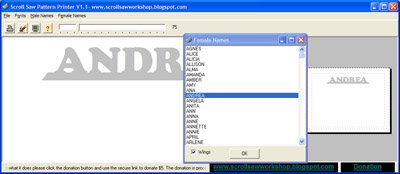
Scroll Saw Pattern Printer update 1.1

Scroll Saw Pattern Printer update 1.1
Download the Free Scroll Saw Pattern Printer Version 1.1. Create name patterns in seconds. Windows PC only.
Download Version 1.1
Please consider a $5 donation for The Scroll Saw Pattern Printer v1.1.

Scroll Saw Keychain Pattern Maker

Use the Scroll Saw Keychain Maker to start a small keychain business. Build yourself a nice display and make up severl keychains with common names. Sell at craft shows, on Ebay or at work. Everyone needs a keychain. Take custom orders. Heck just make them and give them away as gifts. It's all made easy with the Scroll Saw Keychain Maker. Watch the video demonstration then download the file below and get started with the fun.
The following link will start the download process. After the file download is complete just click the setup file and the program will be installed. Please consider a $5 donation for the program.

Download the Oval Keychain Pattern Maker.

Enjoy designing and printing these great personalized key chains. Give them as gifts, make them for fun or sell them at craft shows. It's easy, just watch the video demo then download and install the program. You will be designing these fun projects in minutes. Windows PC only.
Download the Free Oval Key Chain Pattern Maker. Create Oval key chain patterns in seconds.
Download Version .9a
Please consider a $5 donation for The Oval Key Chain Pattern Maker.

Think Safety

Remember to keep the safety of yourself and others in your work shop in your thoughts at all times. Always wear eye and ear protection. Follow all the manufactures warnings that came with your power tools. If I demonstrate something on this web site that you don't feel is safe, don't do it. Your safety is your responsibility. Fingers are handy things, try to keep all of them.
__________________________
Disclaimer:
The Scrollsaw Workshop Blog is in no way affiliated with or sponsored by Scroll Saw Woodworking and Crafts Magazine formerly (Scroll Saw Workshop Magazine) or it's publisher Fox Chapel Publishing.

Scroll Saw Woodworking and Crafts